A useful tech upgrade rarely announces itself with flashing lights or futuristic promises. More often, it solves a small irritation that has been following you through the day: a phone that reaches ten percent before dinner, a television interface that takes forever to load, cables scattered across a desk, or earbuds that make every commute feel longer than it needs to be.
That is where budget-friendly tech gadgets earn their place. The best affordable devices do not try to reinvent your life. They make familiar routines smoother, faster, or less cluttered without demanding a premium price or a complicated setup.
Inexpensive technology can be difficult to judge. Some gadgets solve real problems, while others are attractive novelties with weak software or short lifespans. A low price is only a bargain when the product remains useful after the initial excitement fades.
This guide focuses on practical categories, the features that matter, and the mistakes that can turn an affordable purchase into wasted money.
What Budget-Friendly Should Really Mean
Budget-friendly does not always mean choosing the cheapest item. The lowest-priced option can become expensive if it needs to be replaced quickly, requires extra accessories, or performs so poorly that you eventually buy a better version.
A better definition is simple: the gadget should solve a real problem at a reasonable cost while offering acceptable durability, compatibility, and ease of use.
Before buying, ask how often you will use it, whether it works with your existing devices, and whether the convenience is worth another object, cable, app, or account. A compact charger used every day may be a better investment than a decorative smart display used twice.
Compact USB-C Chargers
A modern USB-C charger is one of the least glamorous upgrades on this list, yet it can be among the most practical. Many households still rely on old adapters, slow charging bricks, and cables borrowed from other devices. One suitable charger can simplify that collection.
The most important factor is power output. A phone may need relatively little power, while a tablet or laptop may require considerably more. Check the recommended charging requirements for your devices rather than assuming that every USB-C charger performs the same way.
Multiport chargers are useful for desks, bedside tables, and travel, but the advertised maximum output may be divided when several devices are connected. Read the power-distribution details carefully.
Choose a reputable model with clear safety information and warranty coverage. Unknown adapters with vague specifications are rarely worth the small saving, especially when they will be connected to expensive devices for hours at a time.
Portable Power Banks
A power bank is worth buying when low battery warnings regularly shape your day. It is especially useful during travel, long commutes, outdoor events, or workdays spent away from convenient outlets.
Capacity is usually described in milliamp-hours, but the largest number is not automatically the best choice. Higher-capacity models are heavier and may take longer to recharge. For everyday phone use, portability can matter more than maximum capacity.
Charging speed, port selection, and cable convenience deserve equal attention. A model with USB-C input and output often fits naturally into a modern device collection. A built-in cable can also reduce the chance of leaving an essential accessory at home.
Consider whether you need to charge only a phone or also a tablet, handheld console, or laptop. Laptop charging requires suitable power output and compatible cables. Reliability and construction matter more than a stylish display showing the remaining percentage.
Affordable Wireless Earbuds
Wireless earbuds are now everyday essentials for many shoppers. Budget models can provide pleasant sound, dependable controls, and enough battery life for commuting, exercise, calls, or casual listening.
Choose according to where you will use them. Secure fit and sweat resistance matter for workouts. Clear microphones are more important for frequent calls. Strong passive isolation can help on public transport, while an awareness mode may be useful outdoors.
Active noise cancellation is increasingly available at lower prices, but performance varies. A budget pair may soften steady background noise without creating complete silence. That can still be useful when expectations are realistic.
Comfort should come before a long feature list. Earbuds that sound impressive but become painful after thirty minutes will not feel like good value. Look for several ear-tip sizes, stable connectivity, simple controls, and a case that fits easily into a pocket.
Bluetooth Item Trackers
An item tracker can be a remarkably affordable solution for anyone who regularly misplaces keys, bags, wallets, or luggage. Its value appears in the moment when an important item is missing and the tracker helps narrow the search.
Compatibility is essential because many trackers work best within a particular phone ecosystem or device-finding network. Confirm that the model supports your smartphone and offers the kind of location assistance you expect.
For objects usually lost inside the home, a loud alert may be more useful than advanced mapping. For luggage or bags that travel farther, the size of the finding network becomes more important.
Check the battery type and replacement options. A replaceable battery can extend the useful life of the tracker, while a rechargeable design reduces disposable batteries but requires regular attention.
A tracker is not a security system or a guarantee of recovering stolen property. It is a locating aid for everyday mistakes.
Smart Plugs
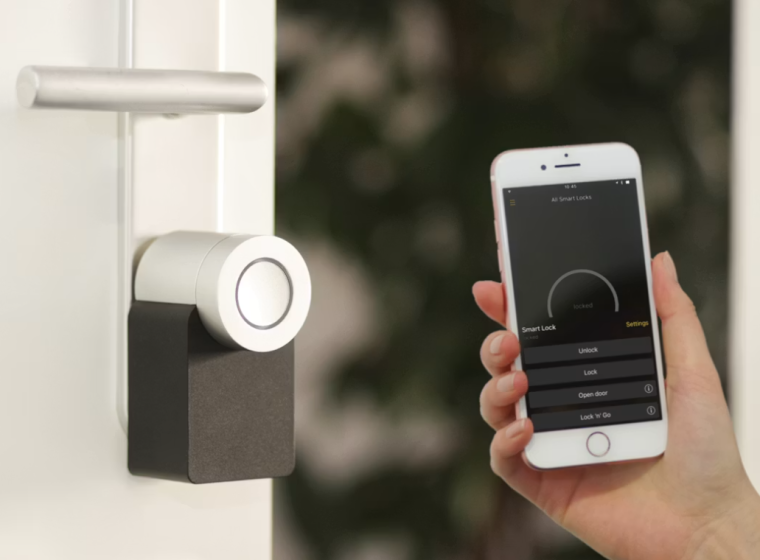
A smart plug is one of the easiest ways to add limited home automation without replacing an appliance. It can allow a lamp, fan, coffee machine, or other compatible device to follow a schedule or respond to app and voice controls.
The appliance must work safely when power is switched on at the outlet. Devices that require a separate button press after receiving power may gain little from a smart plug. High-power appliances also demand careful attention to the plug’s supported electrical load and manufacturer guidance.
Choose a plug that works with your preferred smart-home platform and Wi-Fi setup. Some require a hub, while others connect directly to the network. App quality, account security, and update support matter because a smart plug is still a connected device.
Energy monitoring can be useful, but it is optional. For most households, reliable scheduling and easy manual control provide the greatest everyday value.
Streaming Devices for Older Televisions
A budget streaming device can refresh a television whose built-in software feels slow, outdated, or difficult to navigate. It may provide a cleaner interface, broader app support, and more consistent updates without requiring a new television.
Check the television’s HDMI ports, resolution, and support for picture and audio formats. A basic device may suit a secondary screen, while a 4K model makes more sense for a compatible main television.
The remote control deserves attention. Volume and power buttons can reduce the need for multiple remotes, while voice search may make it easier to find content.
Consider the apps you actually use because service availability can vary by platform and region. A streaming device cannot improve the physical picture quality of an older screen, but it can make finding and playing content feel much newer.
USB-C Hubs
Thin laptops often sacrifice ports in favor of portability. A compact USB-C hub can restore connections for monitors, memory cards, wired internet, keyboards, external storage, and other accessories.
Compatibility is the key consideration. A USB-C connector does not guarantee that the laptop supports every display, data, or charging feature offered by the hub. Check the specifications of both devices before buying.
Purchase for your real workflow. A photographer may value memory-card slots. A home-office user may need HDMI, Ethernet, and charging pass-through. A traveler may prefer a smaller hub with only two or three essential ports.
More ports do not always mean better value. An overloaded design may run warm, become difficult to pack, or include connections you never use. For a permanent desk with several monitors and accessories, a docking station may be more suitable. For occasional expansion, a modest hub is usually enough.
Phone and Tablet Stands
A stand is a simple gadget that can improve video calls, recipe viewing, bedside use, and desk organization. It gives a device a defined place and keeps the screen visible without requiring you to hold it.
Adjustability is the main feature to consider. A useful stand should support comfortable viewing in portrait and landscape orientation and remain stable when the screen is tapped.
Check whether the support arms fit around a protective case and whether a charging cable can remain connected. Foldable models are convenient for travel, while heavier stands are usually more stable on a desk.
A wireless-charging stand reduces cable handling but adds cost and may charge more slowly. Choose it for convenience, not assumed superiority.
Portable Solid-State Drives
Portable solid-state drives sit at the higher end of budget tech, but they can offer strong long-term value for photos, videos, projects, or backups.
Capacity should reflect your actual needs. Documents require relatively little space, while high-resolution images and video can fill a drive quickly. Buying the largest drive available may be unnecessary, but choosing too little capacity can lead to another purchase sooner than expected.
Transfer speed matters most for large files and frequent work. Casual users may not notice the difference between premium and midrange performance. The computer’s port and cable can also limit real-world speed, so paying for specifications your setup cannot use is wasteful.
No portable drive should be treated as indestructible or as a complete backup strategy. Important files should exist in more than one location. Choose an established storage brand, confirm the warranty, and be cautious of unusually cheap high-capacity drives from unfamiliar sellers.
How to Spend a Limited Tech Budget Wisely
Start with the irritation that occurs most often. If your phone is always low on power, buy a charger or power bank before a smart plug. If your laptop lacks ports, a hub may improve every working day more than new earbuds.
Favor products that work in more than one situation. A compact charger can serve at home and while traveling, while a phone stand can support calls, entertainment, and kitchen use.
Confirm compatibility before comparing designs or bonus features. Check ports, charging standards, operating systems, dimensions, app availability, and electrical requirements.
Read recent reviews for patterns. Repeated reports of unreliable apps, connection problems, or poor battery life deserve attention. Also consider the total cost, including adapters, subscriptions, proprietary accessories, and replacement batteries.
Common Buying Mistakes to Avoid
One common mistake is buying around a sale rather than a need. A large discount does not make an irrelevant gadget useful.
Another is prioritizing specification numbers without understanding them. More watts, ports, storage, or features can be beneficial, but only when your devices and habits can use them.
Connected gadgets also depend on apps, accounts, updates, and servers. Poor software can make a smart device more frustrating than a simple alternative.
Do not ignore physical details. A power bank may be too heavy for daily carry, a hub may block a neighboring port, and a stand may not support a thick phone case.
Most importantly, avoid replacing a working product simply because a newer version exists. Keep reliable technology longer and upgrade when the improvement will be noticeable.
Conclusion
The best budget-friendly tech gadgets are not miniature luxury products or temporary distractions. They are practical tools that remove friction from routines you already have. A compact charger, comfortable earbuds, reliable power bank, smart plug, or simple stand can deliver more everyday value than a costly device filled with features you rarely use. Begin with a genuine need, check compatibility carefully, and choose quality where safety, power, storage, or connectivity is involved. Smart buying is less about finding the cheapest gadget and more about finding the affordable one that continues to feel useful long after the box is opened.
Frequently Asked Questions
What is the best budget tech gadget to buy first?
Choose the gadget that solves your most frequent problem. A compact charger is a strong general-purpose option, while a power bank is better for people who spend long periods away from outlets. Home-office users may benefit more from a USB-C hub or adjustable stand.
Are cheap wireless earbuds worth buying?
They can be worthwhile for casual listening, commuting, and calls, provided the fit is comfortable and the connection is stable. Expect practical performance rather than premium noise cancellation, microphone quality, or materials.
How much storage should a portable SSD have?
The right capacity depends on your files. Documents require relatively little space, while high-resolution photos and video projects can fill a drive quickly. Estimate your current storage use, allow room for growth, and maintain another copy of important data.
Are smart plugs safe for every appliance?
No. Check the plug’s supported electrical load and the appliance manufacturer’s instructions. Avoid using a smart plug with equipment that exceeds its rating or should not restart automatically when power is restored.
How can I tell whether a budget gadget is good quality?
Look for clear specifications, compatibility details, warranty information, established safety markings where relevant, and consistent feedback across recent reviews. Be cautious when a product makes unusually strong claims but provides little information about the manufacturer or support.